Posts

Google Chrome: Set default page encoding
Image
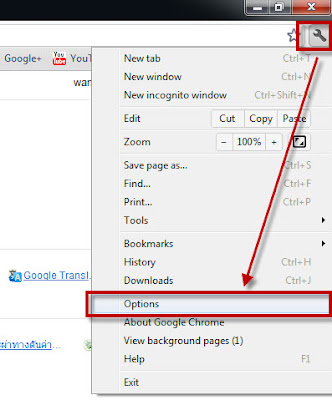
If you always use only English language to browse, you don't have to concern about this issue. But for the people that need to use other language, it might be annoying to set the page encoding every time and in every page. Here is the step to set default page encoding permanently. Environment: Google Chrome version 13.0.782.107 m for Windows - In the right side of the URL bar, there is a tool button. Click at the tool button and then select "Options". - Inside the option page, select "Under the Hood" from the left menu. Under "Web Content" section, click "Customize fonts..." button. - Inside "Fonts and Encoding" window, choose your language at "Encoding" dropdown list and then close the window. - You may have to close Google Chrome to call the new setting encoding page.

Google Contact Group: How to select multiple e-Mail Contact into Google Contact Group

Image
I created Google Contact Group and added people from my contact into it but I found that Google automatically selects only 1 e-Mail from the multiple e-Mail contact. I need to add more e-Mails into the contact group. It's quite hard to find how. So, here it is the way to add: - I will start from adding new group. After you login into Gmail, select "Contacts" and "New Group...". It will pop-up "New Group" box. Enter your group name and click "OK". - Select the new group that you just added. Then, select "Add to " drop box. Type contact name that you want to add and select the e-Mail that you want to specify. - You can keep typing the same name that has many e-Mail address and select more to add until you are satisfy. - Once you are okay, click "Add" to add e-mails from the contact. - The e-Mails from the contact person will be added ...

Microsoft PowerPoint: Set default font for Text Box

Image
Microsoft PowerPoint 2007 has default font in Text Box as "Calibri, 18 pt, black". To set different default font will help you not to change every time you use Text Box - From main menu, select "Home" and then "Text Box". - Place Text Box in the slide and set font and size as you want. - Right click at the boarder of Text Box, then select "Set as Default Text Box". - Next time you use Text Box, it will use the font ans size that you set as a default.

Microsoft Word: Not switch language automatically

Image
This is when you use 2 languages to edit document. And when you put the cursor on the position you want to edit, Microsoft Word will switch the language according to the text surround it. Which I don't want. :( There is the way not to allow this to happen. Please follow these steps: Environment : Microsoft Word 2007 - Click at 'Office' button and then click at 'Word Options'. - Select 'Advanced'. Then uncheck 'Automatically switch keyboard to match language of surrounding text' and click 'OK'.

Cooking: น้ำสลัดพันเกาะ (Thousand Islands)

Image
ส่วนผสม - ไข่ต้มสับ ครึ่งลูก - ซอสวูสเตอร์เชียร์ 1 ช้อน - น้ำตาลทราย ครึ่งช้อน - น้ำส้มสายชู 3 ช้อน - กานพลูบด นิดหน่อย - มายองเนส 1 ช้อน - แตงกวาดองสับ 1 ลูก - มะกอกดองสับ 3 ลูก วิธีทำ ใส่ส่วนผสมทั้งหมดลงในอ่าง ตีให้เข้ากัน เก็บเข้าตู้เย็น เสิร์ฟกับผักสดหรืออาหารทะเล

Cooking: น้ำสลัดใส

สำหรับ 1 จาน เครื่องปรุง - ซอสมะเขือเทศ 1 ช้อน - น้ำมะนาวครึ่งลูก - น้ำตาลทราย 1 ช้อน - มัสตาร์ดผง 1/2 ช้อน - กระเทียมสับละเอียด 1 กลีบ - น้ำส้มสายชู 1 ช้อน - น้ำมันมะกอก Extra Virgin 1/2 ช้อน - เกลือป่นนิดหน่อย - พริกไทยนิดหน่อย วิธีทำ ผสมทุกอย่างเข้าด้วยกัน เน้นรสชาดเปรี้ยวหวาน

Cooking: น้ำสลัดซีซ่าร์

ส่วนประกอบ - มายองเนส 2 ช้อน - มะนาวครึ่งลูก - ซอสวูสเตอร์ไชด์ 1 ช้อน - กระเทียมสับละเอียด 1 กลีบ - เกลือนิดหน่อย - พริกไทยนิดหน่อย - ชีสพาร์เมซาน 2 ช้อน - นม 4 ช้อน วิธีทำ - ผสมทุกอย่างให้เข้ากัน