Posts

Thunderbird: How to add e-Mail account with POP protocal
Image
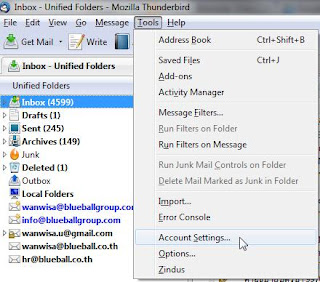
This is the way to add e-Mail account into Thunderbird. Currently, I'm using Thunderbird 3.1.5 to demonstrate. - From the menu bar, select "Tools" and then "Account Settings...". - At the "Account Settings" window, there is a "Account Actions" dropdown list at the bottom left, click and select "Add Mail Account...". - At "Mail Account Setup" window, enter    1) "Your name" = Your name    2) "Email address" = Full e-Mail account    3) "Password" = Your password    4) Check at "Remember password" to let Thunderbird remember it.    Then, click "Continue" button to continue. - Thunderbird will try to find common e-Mail server name for you. But this case it found IMAP protocal. Click "Edit" to change to POP. - Change the values    1) "User name" = Full e-Mail address    2) "Incoming...

Photoshop: How to get rid of oily face

Image
To remove oily face, I use Photoshop 7. - Open Photoshop and your picture file. - Select 'Clone Stamp Tool (S). - Select 'Mode' to be 'Darken'. This option is to make it effect only the area that it's brighter. - Decrease 'Opacity' to be around 50% to adjust the colour bit by bit. - Select 'Softround Brush' in the size you are convenient to. - Select the point that close to the bright area by press 'ALT'+ 'Left Click'. - Then click at the brighter area to adjust the photo. - Result to compare before and after. Before: After:

JavaScript: Call an unnamed form

document.getElementsByTagName("form")[ i ]. . = ; i = [0..n] value = text or boolean or etc. Example: document.getElementsByTagName("form")[0].order_num_users.disabled = true;

FireFox: To enable Cookies

Image
To enable Cookies in FireFox is not easy to see. So, please follow these steps. - From the menu, select "Tools" -> "Options...". - In "Options" dialogue box, click at "Privacy" tab. In "History" section, "Firefox will:", select "Use custom settings for history". - Check "Accept cookies from sites" and then click "OK".

PHP: Install PHP with Windows Web App Gallery - Easiest way to install ever!

Image
I'm so lousy every time that I have to install PHP. Then I found magic way for very beginner user to install PHP! - Starting from download " Web Platform Installer " - After finishing download, run the file. - In the tab "Web Platform", click at "Customize" in section "Frameworks and Runtimes".  - Check at "PHP 5.x.x" and click Install. - Click "I Accept" to continue installation. - Wait for the program to download and install. - Click "Finish".

Windows Live Messenger: Hide into the taskbar in Windows 7

Image
It's so bother to have Windows Live Messenger showing all the time instead of hidden when installed in Windows 7. To hide it: - Open Windows Explorer - Go to "C:\Program Files\Windows Live\Messenger\".    For Windows 7 x64, go to "C:\Program Files (x86)\Windows Live\Messenger\". - Right click at file "msnmsgr.exe" and select "Properties" - In "Compatibility" tab, under "Compatibility mode" box, select dropdown list and choose "Windows Vista (Service Pack 2)". And then click "OK". - Close and reopen Windows Live Messenger.

Thunderbird: Backup and restore

To backup Thunderbird, just copy the profile folder into the backup place. Normally, the default profile folder will be in "C:\Users\< User >\AppData\Roaming\Thunderbird\Profiles\ .default" To restore the profile - Exit Thunderbird program. - Modify profile.ini which by default locates in folder "C:\Users\< User >\AppData\Roaming\Thunderbird"     - IsRelative=0     - Path= - Start Thunderbird. That's it! So easy!